★彡 😄 H͢a͢p͢p͢y͢ T͢e͢x͢t͢ 😄 彡★ - Happy Text Stylish Letters
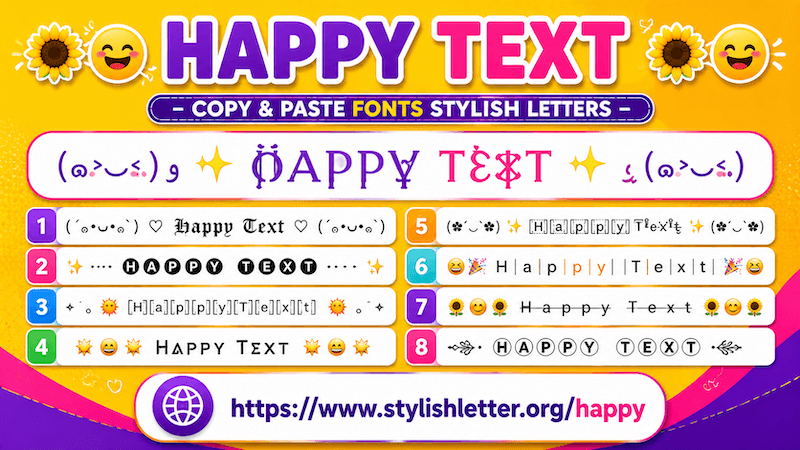
Happy Text is a fancy text style that changes your normal text into stylish fonts and adds symbols
that represent happiness and positive feelings.
It adds Japanese-style emojis (kaomojis), celebration symbols, flowers, sun symbols, clouds,
music icons, and many other decorative elements that create unique and cheerful text styles.
This makes your normal text look more expressive and fun for everyday use.
Here, you will find a collection of more than 100+ happy fancy text styles that you can copy,
paste, and share anywhere you want.
How to Copy and Paste Happy Fancy Text
It is easy to do.
First, click on the input bar and type your name, nickname, or message.
As you do that, this will automatically generates many happy text styles for you.
Now simply click on the one that you like.
As you click it, you will see a "Copied" notification.
That means your text has been copied successfully.
Now you can paste or share it anywhere you want.
Why Should We Use Happy Fancy Text?
Happy fancy text is designed for people who want to send messages that feel more cheerful, welcoming, and
positive.
Sometimes long messages are not necessary. A few words combined with happy symbols and decorative styles can
express feelings in a simpler and more fun way.
Because these text styles adds symbols that represent happiness, they can help make your messages feel more
expressive.
You can send them to friends, family members, or loved ones when you want to share positive energy or brighten
someone’s day.
They also work well for good morning messages, greetings, celebrations, and fun conversations.
Not only that, if you want your username or nickname to reflect a cheerful personality, you can generate happy
fancy nicknames and use them on profiles or websites.
When people see those symbols, they may get the feeling that your style is more playful and positive.
How Can I Generate More Happy Fancy Text?
It is quite easy to do.
Once your facny text is generated and you want more styles, simply scroll down.
There you will find a button called "More Happy Stylish Letters".
Click it to generate 10 more happy fancy text styles.
Click again to generate more.
In this way, you can generate more than 100+ unique happy fancy text styles.
You can copy, paste, and share them anywhere you want.
How Can I Use Regenerate It Button?
It is really easy to use.
As your text is generated, you will notice an icon near the Happy Fonts section.
You can also find the same icon at the bottom Of your screen beside the bulb icon.
When you click it, it refreshes and generates new happy fancy text styles.
Click again and it refreshes again.
You can continue doing this to explore more styles instantly.
If you want to copy one, simply click it and you will see a copied notification.
This feature is especially useful for people who do not like scrolling.
If you prefer scrolling, you can continue using the "More Happy Stylish Letters" button.
How Can I Make Happy Fancy Text for Games?
It is really easy to do.
If you want a happy-style username for games such as Call of Duty, Free Fire, PUBG, or similar games, you can
create one here.
To make it more suitable for gaming, you can use the built-in decoration feature.
First, generate your happy fancy text.
Then click the green background colored Deco button beside the style you like.
This opens the Flourish Stylish Letter popup.
Inside the Select Option menu, choose Gamer Flourish.
This option decorates your happy fancy text with gaming-inspired symbols and creates a more unique style.
If you do not like the current result, simply click the regenerate button to generate more designs.
To copy any style, just click it and it will be copied automatically.